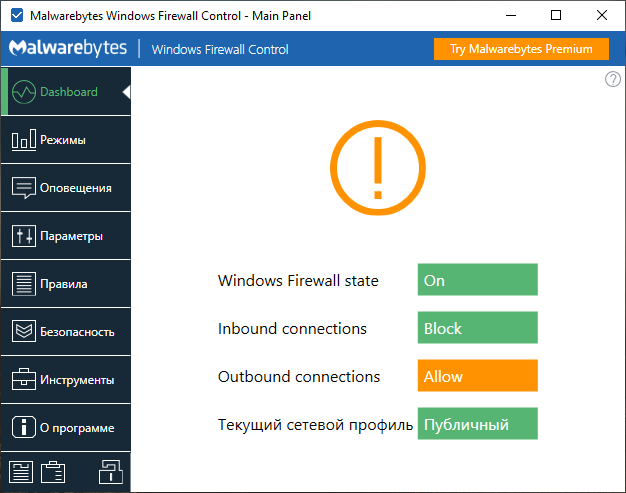
Malwarebytes Windows Firewall Control 6.36.0.0 – Advanced Firewall Management for Windows
Malwarebytes Windows Firewall Control 6.36.0.0 is a powerful and lightweight security utility designed to make the built-in Windows Firewall easier to manage. Instead of replacing Microsoft Windows Firewall with a completely separate firewall engine, the program provides an advanced interface that gives users greater control over existing firewall rules, network connections, applications, and filtering profiles.
The software is especially useful for advanced Windows users, system administrators, security enthusiasts, and anyone who wants better visibility and control over which programs are allowed to communicate through the network.
Better Control Over Windows Firewall
Windows already includes a powerful firewall, but its advanced configuration interface can be difficult for many users to navigate.
Windows Firewall Control simplifies this process by providing quick access to important firewall functions from a cleaner and more convenient interface.
Users can easily review existing firewall rules, create new rules, block unwanted applications, allow trusted programs, and monitor network activity without repeatedly navigating through Windows Defender Firewall’s advanced management console.
Multiple Firewall Filtering Modes
One of the most useful features of Windows Firewall Control is its support for different filtering profiles.
Depending on the required security level, users can select from several filtering modes.
High Filtering blocks network connections and can be useful in situations where temporary network isolation is required.
Medium Filtering blocks outbound connections unless an appropriate allow rule exists, providing much stricter control over applications attempting to access the internet.
Low Filtering allows most outbound traffic while continuing to rely on firewall rules to block unwanted connections.
No Filtering disables Windows Firewall filtering and should generally be used only for troubleshooting or specific administrative situations.
These different modes allow users to quickly adjust firewall behavior depending on their security requirements.
Application Network Control
Malwarebytes Windows Firewall Control 6.36.0.0 allows users to control how individual applications communicate with local networks and the internet.
Firewall rules can be created to allow or block specific programs.
For example, users can prevent an application from accessing the internet while allowing the rest of the computer to remain connected normally.
This can be useful for restricting unnecessary background connections, troubleshooting software, protecting privacy, or preventing unknown applications from communicating externally.
Manage Inbound and Outbound Connections
The software provides control over both inbound and outbound firewall rules.
Inbound rules determine which external devices, services, or network connections can communicate with the computer.
Outbound rules determine which applications and services installed on the computer are allowed to establish external connections.
Having convenient access to both types of rules makes Windows Firewall Control a useful tool for advanced network security management.
Firewall Notifications
Another important feature is the ability to receive notifications related to network activity.
When an application attempts to establish a connection that is not covered by an existing rule, Windows Firewall Control can help users identify the application and determine whether the connection should be allowed or blocked.
This provides greater transparency regarding which programs are communicating over the network.
For experienced users, these notifications can be particularly useful for discovering unexpected background connections.
Firewall Rules Management
Windows Firewall Control provides centralized access to existing Windows Firewall rules.
Users can review, create, edit, and remove firewall rules depending on their requirements.
Rules can be configured according to different parameters, including application path, connection direction, network profile, and whether traffic should be allowed or blocked.
Proper firewall rule management can significantly improve both system security and network visibility.
Connection Monitoring and Logs
Monitoring network activity is an important part of maintaining a secure Windows system.
Windows Firewall Control can help users inspect firewall activity and identify network connections that have been allowed or blocked.
Firewall logs can be useful for troubleshooting connectivity problems, investigating unusual network behavior, and determining why a particular application cannot connect to the internet.
They can also help advanced users create more accurate firewall rules based on actual network activity.
Lightweight System Integration
One of the main advantages of Windows Firewall Control is that it does not require a separate firewall driver or independent firewall engine.
Instead, it works with Microsoft’s built-in Windows Firewall infrastructure.
This approach helps keep resource usage relatively low while benefiting from the firewall technology already integrated into Windows.
Users therefore gain a more convenient management interface without introducing another complete firewall platform into the operating system.
Security and Privacy Benefits
Controlling outbound network connections can provide an additional layer of visibility over software running on a computer.
Applications that do not require internet access can be restricted, while trusted software can be explicitly permitted.
This approach can help reduce unnecessary network communication and make suspicious connection attempts easier to identify.
However, firewall rules should always be configured carefully. Blocking essential Windows services or trusted applications may cause network connectivity problems or prevent certain software features from working correctly.
Designed for Advanced Windows Users
Although Windows Firewall Control simplifies many firewall-management tasks, users should still understand the basic concepts of inbound and outbound connections before creating complex rules.
Incorrect firewall configurations can prevent browsers, games, communication software, Windows services, or other applications from connecting properly.
For this reason, beginners may prefer to use the default filtering configuration, while experienced users can take advantage of the more advanced rule-management features.
Windows Compatibility
Malwarebytes Windows Firewall Control is designed to work with Microsoft Windows and uses the operating system’s built-in firewall technology.
Current Malwarebytes documentation describes Windows Firewall Control functionality for Windows 10 and Windows 11 systems.
The exact availability of individual features can depend on the Windows version, product edition, and configuration being used.
Why Use Malwarebytes Windows Firewall Control 6.36.0.0?
Windows Firewall Control is a useful choice for users who want more control over Windows network security without completely replacing the built-in firewall.
Its combination of configurable filtering profiles, application-specific rules, connection management, notifications, and firewall monitoring provides a more accessible way to manage Windows Firewall.
The program is particularly valuable for users who frequently install software, test applications, troubleshoot network connections, or want to know which programs are communicating with the internet.
Conclusion
Malwarebytes Windows Firewall Control 6.36.0.0 is a practical firewall management utility that expands the usability of Microsoft’s built-in Windows Firewall.
Instead of introducing a completely separate firewall system, it provides a convenient interface for managing network rules, filtering modes, application permissions, and connection activity.
For users who want stronger control over inbound and outbound network traffic while continuing to rely on Windows Firewall technology, Windows Firewall Control remains a useful security and administration tool.
Its lightweight design, flexible filtering options, detailed rule management, and network-monitoring capabilities make it a valuable addition to a Windows security toolkit.